se Access non funziona lanciare il seguente comando
taskill /F /T /IM access.exe /FI access.exe /FI “USERNAME eq softbeton”
Outlook con pst da 50 gb
Chiave di registro
HKEY_CURRENT_USER\Software\Microsoft\Office\
Crea o modifica questi valori DWORD (32 bit):
• MaxLargeFileSize → imposta a 102400 (significa 100 GB)
• WarnLargeFileSize → imposta a 95000
Apri Outlook → premi ALT + F11 per aprire l’editor VBA
Vai su Inserisci → Modulo
script Duplicati VBA Semplice
Sub RimuoviEmailDuplicate()
Dim olFolder As Outlook.Folder
Dim olItem As Object
Dim olDict As Object
Dim key As String
Dim dupFolder As Outlook.Folder
Set olFolder = Application.ActiveExplorer.CurrentFolder
Set olDict = CreateObject(“Scripting.Dictionary”)
On Error Resume Next
Set dupFolder = olFolder.Folders(“Duplicati”)
If dupFolder Is Nothing Then
Set dupFolder = olFolder.Folders.Add(“Duplicati”)
End If
On Error GoTo 0
Dim i As Long
For i = olFolder.Items.Count To 1 Step -1
Set olItem = olFolder.Items(i)
If olItem.Class = olMail Then
key = LCase(Trim(olItem.Subject)) & “|” & _
LCase(Trim(olItem.SenderName)) & “|” & _
olItem.SentOn & “|” & olItem.Size
If olDict.Exists(key) Then
olItem.Move dupFolder
Else
olDict.Add key, True
End If
End If
Next i
MsgBox “Operazione completata. I duplicati sono stati spostati nella cartella ‘Duplicati’.”, vbInformation
End Sub
Script VBA Completo
Option Explicit
Public Sub RimuoviEmailDuplicate_TutteLeCartelle()
Dim ns As Outlook.Namespace
Dim pstFolder As Outlook.Folder
Dim startFolder As Outlook.Folder
Set ns = Application.GetNamespace(“MAPI”)
‘ Se vuoi scegliere manualmente il PST radice:
Set pstFolder = Application.Session.PickFolder
If pstFolder Is Nothing Then
MsgBox “Operazione annullata.”, vbInformation
Exit Sub
End If
ProcessFolder pstFolder
MsgBox “Completato! I duplicati sono stati spostati nelle cartelle ‘Duplicati’ all’interno delle rispettive cartelle.”, vbInformation
End Sub
Private Sub ProcessFolder(ByVal olFolder As Outlook.Folder)
Dim olItem As Object
Dim olDict As Object
Dim dupFolder As Outlook.Folder
Dim key As String
Dim i As Long
Set olDict = CreateObject(“Scripting.Dictionary”)
‘ Crea o individua la cartella “Duplicati”
On Error Resume Next
Set dupFolder = olFolder.Folders(“Duplicati”)
If dupFolder Is Nothing Then
Set dupFolder = olFolder.Folders.Add(“Duplicati”)
End If
On Error GoTo 0
‘ Controlla gli elementi della cartella corrente
For i = olFolder.Items.Count To 1 Step -1
Set olItem = olFolder.Items(i)
If olItem.Class = olMail Then
key = LCase(Trim(olItem.Subject)) & “|” & _
LCase(Trim(olItem.SenderName)) & “|” & _
Format(olItem.SentOn, “yyyymmddhhmmss”) & “|” & olItem.Size
If olDict.Exists(key) Then
olItem.Move dupFolder
Else
olDict.Add key, True
End If
End If
Next i
‘ Ricorsione nelle sottocartelle
Dim subFolder As Outlook.Folder
For Each subFolder In olFolder.Folders
If LCase(subFolder.Name) <> “duplicati” Then
ProcessFolder subFolder
End If
Next subFolder
End Sub
Wsus se salta per aggiornamenti
Da powershell lanciare come amministratore questi comandi
net stop wuauserv
net stop cryptSvc
net stop bits
net stop msiserver
Ren C:\Windows\SoftwareDistribution SoftwareDistribution.old
Ren C:\Windows\System32\catroot2 Catroot2.old
net start wuauserv
net start cryptSvc
net start bits
net start msiserver
Aggiornare office se non si riesce a forzare
Computer\HKEY_LOCAL_MACHINE\SOFTWARE\Policies\Microsoft\office\16.0\common\officeupdate
e mettera la chiave enableautomaticupdates ad 1
Resettare una password persa utente windows
montare partizione windows
/mnt/Windows/System32/config
chntpw -u NOMEUTENTE SAM
qualora non ricordiamo l’utente : chntpw -l SAM
aggiunta siti manuale in ProxyOverride
lanciare regedit
e cercare — COMPUTER –> HKEY_CURRENT_USER –> Software –> Microsoft –> Windows –> CurrentVersion –> Internet Setting
Modificare in ProxyOverride aggiungendo sito che deve essere visto
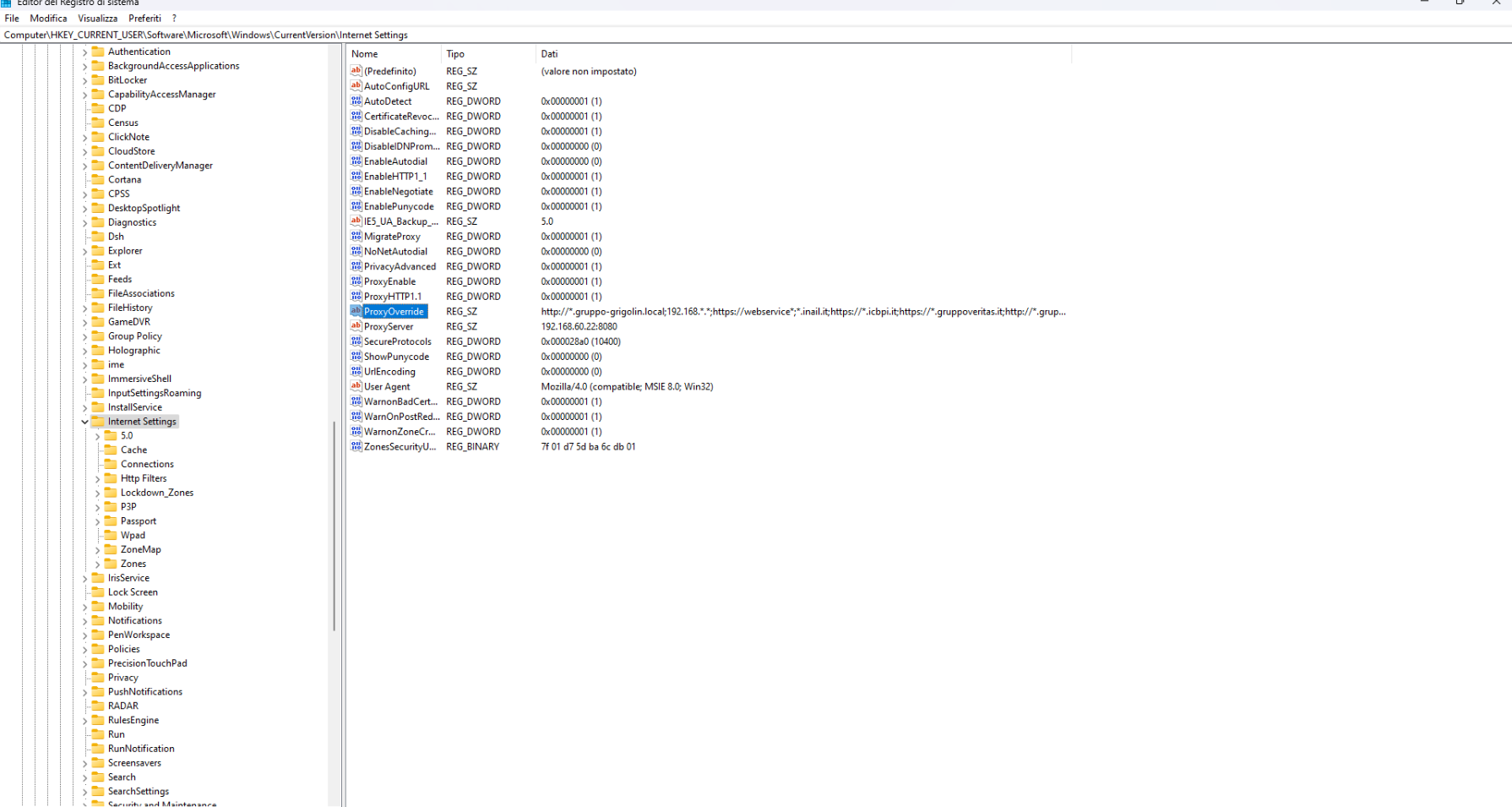
Riavviare servizi da powershell
da lanciare in powershell
devi cercare da start — POWERSHELL — apri percorso file — e poi shift + tasto dx mouse e dai esegui come altro utente
esempio
cmd.exe /c “sc \\ipmacchina stop uvnc_service”
cmd.exe /c “sc \\ipmacchina start uvnc_service”
Come abilitare gli accessi guest non sicuri in SMB2 e SMB3
abilitare accesi guest non sicuri
da powershell come amministratore lanciare la seguente stringa
Set-SmbClientConfiguration -EnableInsecureGuestLogons $true -Force
per renderla permanente – sempre da powershell come amministratore
Set-ItemProperty -Path “HKLM:\SYSTEM\CurrentControlSet\Services\LanmanWorkstation\Parameters” -Name AllowInsecureGuestAuth -Value 1 -Type DWord
Risoluzione problemi office 2016
SE CONTINUA A CHIEDERE LA CHIAVE ANCHE UNA VOLTA ATTIVATO:
– Eliminare queste 2 chiavi di registro:
1. HKEY_LOCAL_MACHINE\SOFTWARE\Wow6432Node\Microsoft\Office\16.0\Common\OEM
2. HKEY_LOCAL_MACHINE\SOFTWARE\Microsoft\Office\16.0\Common\OEM
————————————————————————————
PER APRIRE I FOGLI EXCEL IN FINESTRE DIFFERENTI:
– Aggiungere o cambiare la chiave di registro:
1. Computer\HKEY_CURRENT_USER\Software\Microsoft\Office\16.0\Excel\Options
DisableMergeInstance
Da 0 a 1
————————————————————————————
WORKAROUND POTENZIALE PER UN BUG DEI FOGLI BIANCHI ALL’APERTURA DI EXCEL
– Cambiare la chiave Default in:
Computer\HKEY_CLASSES_ROOT\Excel.Sheet.12\shell\Open\command
Computer\HKEY_CLASSES_ROOT\Excel.Sheet.8\shell\Open\command
Computer\HKEY_CLASSES_ROOT\Excel.SheetBinaryMacroEnabled.12\shell\Open\command
Computer\HKEY_CLASSES_ROOT\Excel.SheetMacroEnabled.12\shell\Open\command
da “C:\Program Files\Microsoft Office\Root\Office16\EXCEL.EXE” /dde
a “C:\Program Files\Microsoft Office\Root\Office16\EXCEL.EXE” “%1”
————————————————————————————
FORZARE CAMBIO CHIAVE DI ATTIVAZIONE OFFICE SE NON VIENE ACCETTATA ALL’ATTIVAZIONE
– CMD come Amministratore ed entrare nel seguente percorso ed eseguire il commando:
1. “C:\Program Files\Microsoft Office\Office16”
2. cscript ospp.vbs /inpkey:CHIAVE_NUOVA
————————————————————————————
NON APPARE IL POP-UP DI LOGIN OUTLOOK
OPTION 0 – Aprire Word e premere Disconnetti nel profilo in alto a destra
OPTION 1 – Disconnect the Work or School account in Windows Settings. To do this,
use the following method. First close down Outlook. Hold the Windows + I
keys simultaneously to open the Settings window. Then click
Accounts > Access work or school to open the accounts settings options.
Now highlight the account you’re having issues with and click Disconnect.
Once done, open Outlook and you should now be prompted for your username
and password.
OPTION 2 – Disable Modern Authentication by regedit to
HKEY_CURRENT_USER\Software\Microsoft\Office\16.0\Common\Identity, create
a DWORD item named EnableADAL and set it to zero.
OPTION 3 – Under the same registry key, create a DWORD item named
DisableADALatopWAMOverride and set it to 1.
NOTE: If you try Option 2 or 3 and it doesn’t fix it, be sure to delete the key you
created. Just to keep things clean and not cause problems later on.
—————————————————————————————
DISAPPEAR DELLE CARTELLE PUBBLICHE / CASELLE CONDIVISE / CALENDARI CONDIVISI LEGATI ALLA CACHE:
!! Aprire REGEDIT non da Amministratore !!
Al posto di x.0 inserire la versione di Office (ad esempio 16.0 per Office 2016)
HKEY_CURRENT_USER\Software\Microsoft\Office\x.0\Outlook\Autodiscover
DWORD: ExcludeLastKnownGoodUrl
Value: 1
o aggiungere qua
HKEY_CURRENT_USER\Software\Policies\Microsoft\Office\x.0\Outlook\Autodiscover
DWORD: ExcludeLastKnownGoodUrl
Value: 1
ES: Computer\HKEY_CURRENT_USER\SOFTWARE\Microsoft\Office\16.0\Outlook\AutoDiscover
Se si blocca Framework
Computer\HKEY_LOCAL_MACHINE\SOFTWARE\Policies\Microsoft\Windows\WindowsUpdate\AU
e mettere sulla chiave UseWUServer 0