se Access non funziona lanciare il seguente comando
taskill /F /T /IM access.exe /FI access.exe /FI “USERNAME eq softbeton”
Hard reset unifi da ssh e adopt
syswrapper.sh restore-default & set-default &
al riavvio entrare in ssh
mca-cli-op set-inform http://ip:porta/inform
Outlook con pst da 50 gb
Chiave di registro
HKEY_CURRENT_USER\Software\Microsoft\Office\
Crea o modifica questi valori DWORD (32 bit):
• MaxLargeFileSize → imposta a 102400 (significa 100 GB)
• WarnLargeFileSize → imposta a 95000
Apri Outlook → premi ALT + F11 per aprire l’editor VBA
Vai su Inserisci → Modulo
script Duplicati VBA Semplice
Sub RimuoviEmailDuplicate()
Dim olFolder As Outlook.Folder
Dim olItem As Object
Dim olDict As Object
Dim key As String
Dim dupFolder As Outlook.Folder
Set olFolder = Application.ActiveExplorer.CurrentFolder
Set olDict = CreateObject(“Scripting.Dictionary”)
On Error Resume Next
Set dupFolder = olFolder.Folders(“Duplicati”)
If dupFolder Is Nothing Then
Set dupFolder = olFolder.Folders.Add(“Duplicati”)
End If
On Error GoTo 0
Dim i As Long
For i = olFolder.Items.Count To 1 Step -1
Set olItem = olFolder.Items(i)
If olItem.Class = olMail Then
key = LCase(Trim(olItem.Subject)) & “|” & _
LCase(Trim(olItem.SenderName)) & “|” & _
olItem.SentOn & “|” & olItem.Size
If olDict.Exists(key) Then
olItem.Move dupFolder
Else
olDict.Add key, True
End If
End If
Next i
MsgBox “Operazione completata. I duplicati sono stati spostati nella cartella ‘Duplicati’.”, vbInformation
End Sub
Script VBA Completo
Option Explicit
Public Sub RimuoviEmailDuplicate_TutteLeCartelle()
Dim ns As Outlook.Namespace
Dim pstFolder As Outlook.Folder
Dim startFolder As Outlook.Folder
Set ns = Application.GetNamespace(“MAPI”)
‘ Se vuoi scegliere manualmente il PST radice:
Set pstFolder = Application.Session.PickFolder
If pstFolder Is Nothing Then
MsgBox “Operazione annullata.”, vbInformation
Exit Sub
End If
ProcessFolder pstFolder
MsgBox “Completato! I duplicati sono stati spostati nelle cartelle ‘Duplicati’ all’interno delle rispettive cartelle.”, vbInformation
End Sub
Private Sub ProcessFolder(ByVal olFolder As Outlook.Folder)
Dim olItem As Object
Dim olDict As Object
Dim dupFolder As Outlook.Folder
Dim key As String
Dim i As Long
Set olDict = CreateObject(“Scripting.Dictionary”)
‘ Crea o individua la cartella “Duplicati”
On Error Resume Next
Set dupFolder = olFolder.Folders(“Duplicati”)
If dupFolder Is Nothing Then
Set dupFolder = olFolder.Folders.Add(“Duplicati”)
End If
On Error GoTo 0
‘ Controlla gli elementi della cartella corrente
For i = olFolder.Items.Count To 1 Step -1
Set olItem = olFolder.Items(i)
If olItem.Class = olMail Then
key = LCase(Trim(olItem.Subject)) & “|” & _
LCase(Trim(olItem.SenderName)) & “|” & _
Format(olItem.SentOn, “yyyymmddhhmmss”) & “|” & olItem.Size
If olDict.Exists(key) Then
olItem.Move dupFolder
Else
olDict.Add key, True
End If
End If
Next i
‘ Ricorsione nelle sottocartelle
Dim subFolder As Outlook.Folder
For Each subFolder In olFolder.Folders
If LCase(subFolder.Name) <> “duplicati” Then
ProcessFolder subFolder
End If
Next subFolder
End Sub
IPTABLES su linux
creo le regole in
/etc/iptables/rules.v4
per salvare le modifiche
iptables-restore < /etc/iptables/rules.v4
Wsus se salta per aggiornamenti
Da powershell lanciare come amministratore questi comandi
net stop wuauserv
net stop cryptSvc
net stop bits
net stop msiserver
Ren C:\Windows\SoftwareDistribution SoftwareDistribution.old
Ren C:\Windows\System32\catroot2 Catroot2.old
net start wuauserv
net start cryptSvc
net start bits
net start msiserver
Aggiornare office se non si riesce a forzare
Computer\HKEY_LOCAL_MACHINE\SOFTWARE\Policies\Microsoft\office\16.0\common\officeupdate
e mettera la chiave enableautomaticupdates ad 1
Resettare una password persa utente windows
montare partizione windows
/mnt/Windows/System32/config
chntpw -u NOMEUTENTE SAM
qualora non ricordiamo l’utente : chntpw -l SAM
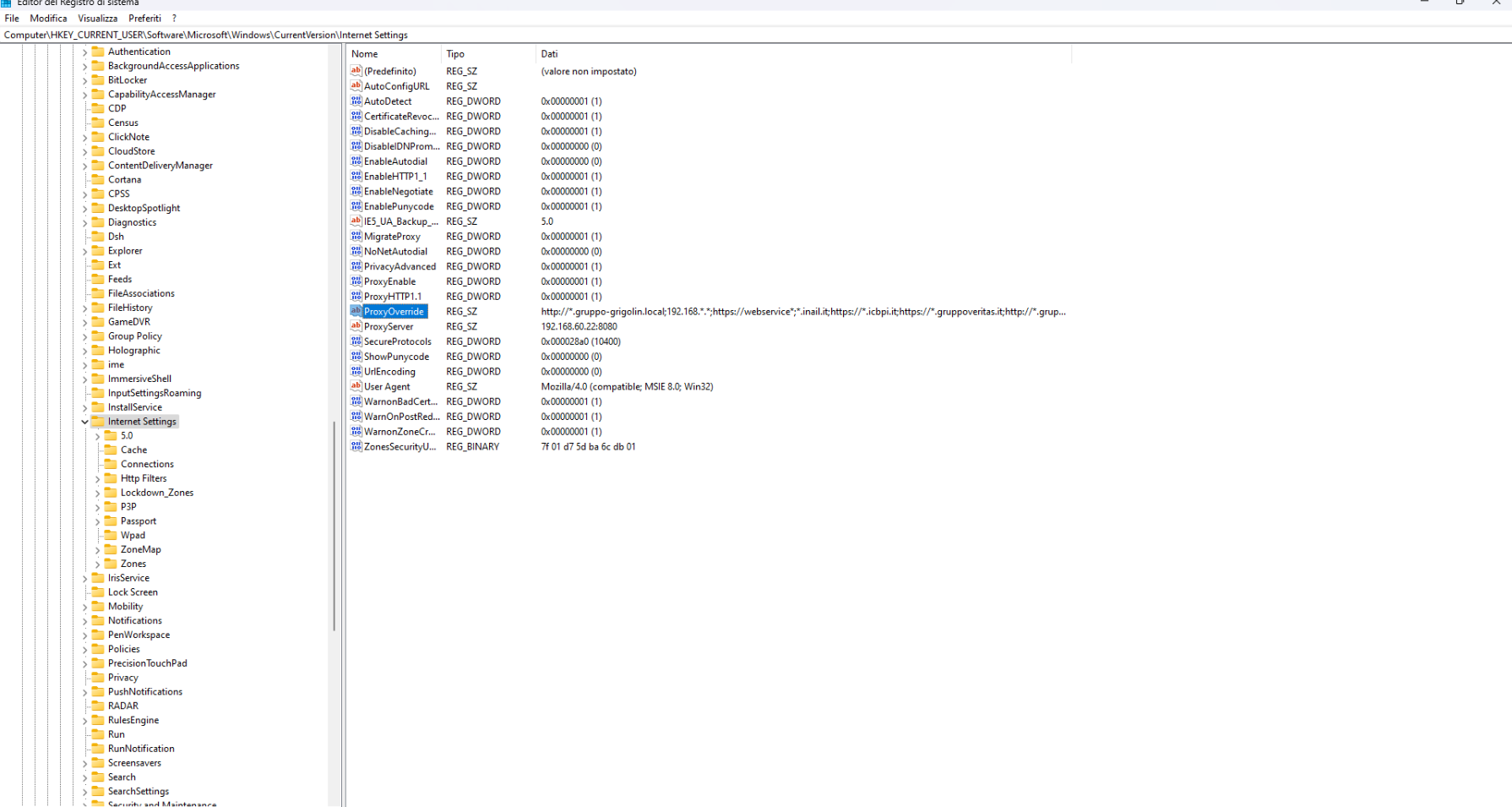
aggiunta siti manuale in ProxyOverride
lanciare regedit
e cercare — COMPUTER –> HKEY_CURRENT_USER –> Software –> Microsoft –> Windows –> CurrentVersion –> Internet Setting
Modificare in ProxyOverride aggiungendo sito che deve essere visto
Riavviare servizi da powershell
da lanciare in powershell
devi cercare da start — POWERSHELL — apri percorso file — e poi shift + tasto dx mouse e dai esegui come altro utente
esempio
cmd.exe /c “sc \\ipmacchina stop uvnc_service”
cmd.exe /c “sc \\ipmacchina start uvnc_service”
Come abilitare gli accessi guest non sicuri in SMB2 e SMB3
abilitare accesi guest non sicuri
da powershell come amministratore lanciare la seguente stringa
Set-SmbClientConfiguration -EnableInsecureGuestLogons $true -Force
per renderla permanente – sempre da powershell come amministratore
Set-ItemProperty -Path “HKLM:\SYSTEM\CurrentControlSet\Services\LanmanWorkstation\Parameters” -Name AllowInsecureGuestAuth -Value 1 -Type DWord